📌 Lifecycle of tasks in the plugin
🔄 Full cycle of task execution
Knowledge Base --> Planned --> In Progress --> Completed ("History")
- Knowledge Base - Source repository of materials
- Planned - Tasks added to the execution queue
- In Progress - Actively executed tasks
- History - Completed tasks
Task management buttons
“Create task” button
All sections (“Knowledge Base”, “Planned”, “In Progress”)
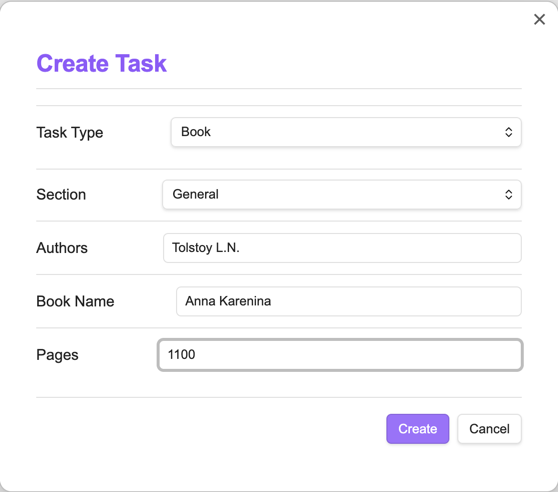
Common fields:
| Field | Description |
|---|---|
| Task type | Choose from configured types |
| Section | Subject category |
Additional fields by type:
| Task type | Additional fields |
|---|---|
| 📚 Book | Author, Title, Pages |
| 📄 Article | Link, Effort (hours) |
| ▶ Video | Author, Platform, Link, Duration (minutes) |
| 🎧 Podcast | Author, Platform, Link, Duration (minutes) |
| 🎓 Course | Platform, Link, Duration (minutes) |
| ✏️ Custom | Effort (hours) |
Example of a task file (Book):
---
status: in-progress
type: Book
section: Literature
authors: Tolstoy L.N.
name: War and Peace
title: Tolstoy L.N. - War and Peace
pages: 1274
order: 3
startDate: 2025-05-31
dueDate: 2025-12-31
---

## Execution plan

- [ ] Read volume 1
- [ ] Read volume 2
- [ ] Read volume 3
- [ ] Read volume 4
“Add to queue” button (from “Knowledge Base” only)
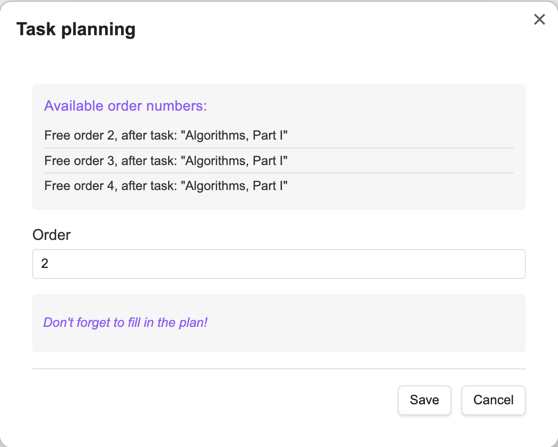
- Filling in the execution order: the first free task orders of the same type as those being added to the queue are displayed.
- Reminder about the need to add an execution plan.
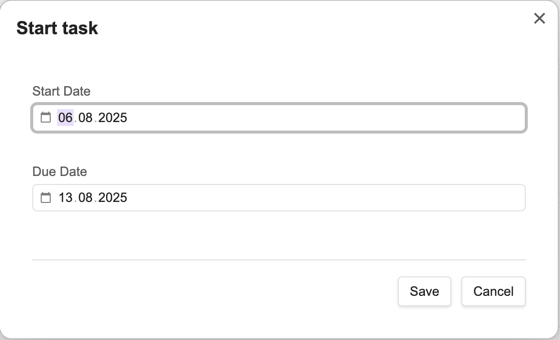
“Take into work” button (only from “Planned”)
Filled-in fields:
- Start date (automatically inserts the current date)
- The date of taking the task into work cannot be earlier than the current date
- Planned completion date
- The planned completion date cannot be earlier than the start date
“Complete” button (only from “In work”)
Filled-in fields:
- Brief task review
- Estimate (⭐️1-5)
- Actual completion date
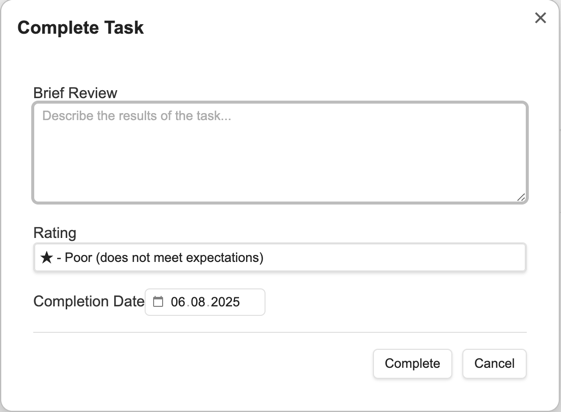
Result: Transferring the task to History
“Postpone” button (only from “In work”)
Return to “Planned” with cleared start and end dates
“Delete task” button
Irreversibly deletes the task!
📂 Task types and their structure
Common fields for all types
- Status (
status): current task status:- “In-progress” (
in-progress), - “Planned” (
planned), - “Knowledge base” (
knowledge-base)
- “In-progress” (
- Type (
type): task type: Book, Podcast, Course, etc. - Section (
section): task section - Title (
title): task name - Priority (
order): order of execution - StartDate (
startDate): task start date - DueDate (
dueDate): planned completion date
Additional fields
Book
- Author(s) (
authors): author’s full name or list of authors - Title (
name): book name - Pages (
pages): total number of pages
Task name for books is filled with the value “Author - Title”
Article
- Source (
link): publication link - Duration (
durationInMinutes): duration in minutes
Video
- Author/Channel (
author): Content creator - Platform (
platform): YouTube/Coursera etc. - Link (
link): Video URL - Duration (
durationInMinutes): Duration in minutes
Podcast
- Platform (
platform): YouTube/Coursera etc. - Link (
link): link to the podcast - Episodes (
episodes): number of episodes in the podcast - Duration of one episode (
durationInMinutes): duration in minutes
Course
- Platform (
platform): course platform - Link (
link): link to the course - Duration (
durationInMinutes): duration in minutes
Custom type
- Labor Input (
laborInputInHours): in hours
💡 Recommendations for work
- For complex tasks, use detailed execution plans
- Regularly check the “Planned” section to update priorities
- Use the history of completed tasks to analyze productivity